


Campus Parent
3.32.41K Reviews
App Specs
- Version
- 1.12.3
- Updated On
- License
- Free
- Downloads
- 1,000,000+
- Developer
- Infinite Campus, Inc.
- Categories
- Education
- Platform
- Android, iOS
Screenshots
 Analysis by AppCompare
Ever been stuck wondering how to keep track of your kid's school life without feeling like you're cramming for finals? Well, let me introduce you to Campus Parent. This app is like a backstage pass to your child's academic world, and trust me, it's a game changer.
Where the app fits in a school routine
Campus Parent is a free education app from Infinite Campus, Inc., built for families whose schools use its system. That last detail matters: it is not a general school organizer that you can fill with any school's timetable. The school needs to provide access, and your account depends on the district's setup. For families already using Infinite Campus, though, it can bring school information into one place instead of scattering it across paper notices, separate portals, and messages from different staff members.
I would think of it as a parent-facing window onto the school record, not a replacement for talking with a teacher or checking in with a child. Its value is strongest when the school keeps its records current and when a parent wants a quick overview between other daily tasks. If your school uses a different student-information system, or shares updates only through its own website or email, this app is unlikely to become your main school tool.
What the version tells existing users
The current version is 1.11.5, while the app first appeared on September 20, 2018. That gives the product a history, but those facts alone do not tell me which screens or functions have changed over time. I would avoid treating a version number as proof of a major redesign or a particular new feature. What matters in practice is whether the present app continues to make school information easy to find on the phone you use.
For existing families, a sensible way to judge a new version is to check the routines that matter most: can you get into your account, locate the right student's information, and reach the details you need without detouring through several screens? If something looks different after an update, I would first check that the selected student and school year are the ones you intended, then confirm important details through the school's usual channels before acting on them.
Getting Started with Campus Parent
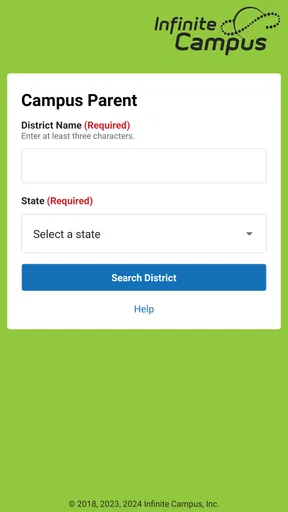
First things first, downloading the app is a breeze. Available on both Android and iOS, you can easily find it in the app store. Once installed, setting it up is as straightforward as pie. You'll need your school's district code and your login credentials – usually provided by the school. This might seem a bit formal at first, but once you're in, it's smooth sailing.
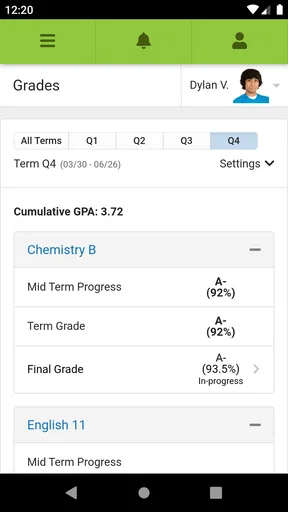
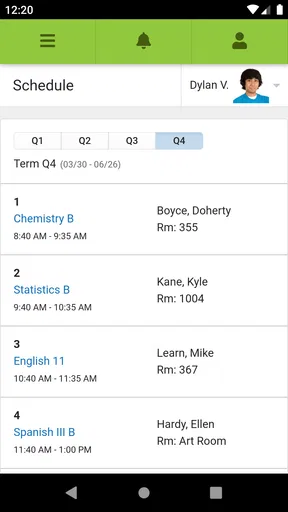
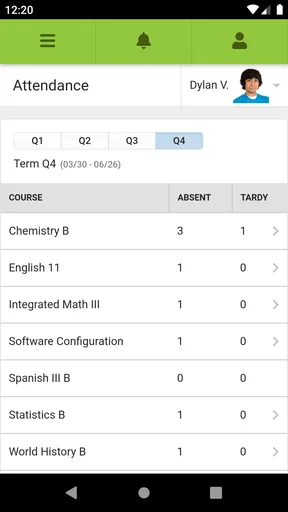
What I love about Campus Parent is its user-friendly interface. The dashboard is clean and intuitive, which means you don't need a degree in rocket science to navigate it. You’ve got everything right there – attendance, grades, assignments, and even lunch balances. It's like having a personal assistant for your kid's school life.
Worth Reading Before You Choose

EA SPORTS FC Mobile 26 Is a Bigger Football Game, but It Takes Time

Flipboard Shows What News Apps Must Do Beyond the Feed

Switching to Android Auto Means Rethinking Your Driving Routine

Google Calendar Makes a Crowded Week Easier to Manage

Ludo King Makes the Most of the Minutes Between Plans

Baby Panda World Brings Quick Play to Modern Phones, but Its Game Library Feels Busy
Features That Make Life Easier
Let's dive into what makes this app a must-have for parents. The real-time updates are a lifesaver. Whether it's a sudden change in the schedule or a new grade posted, you’ll get notified instantly. No more waiting for report cards to come home or relying on your child’s memory for updates.
Another feature that stands out is the assignment tracker. You can see due dates and details for each task, making it easy to plan study sessions or remind your kiddo about upcoming deadlines. It’s perfect for keeping procrastination at bay.
Communication is another strong point. The app allows you to send and receive messages from teachers without the hassle of emails or phone calls. It's a direct line to your child's educators, which can be invaluable for quick updates or clarifying doubts.
Using the information without turning it into pressure
A practical routine is to check assignments and attendance at a predictable time, such as after dinner, rather than refreshing the app throughout the day. That gives you a chance to notice a missing task or an unexplained absence while leaving room for your child to explain what happened. I find that this works better than treating every new grade as an emergency; a single entry is a prompt for a conversation, not always a complete picture of a student's progress.
For a busy household, the app can also help two caregivers coordinate around the same school information. One person might check the day's schedule before arranging pickup, while the other looks at an assignment later. The useful trade-off is that both adults can refer to the same record, but they still need to agree on who will follow up. A shared view does not automatically create a shared plan.
Notifications are most useful when they reduce the need to remember to check, but too many alerts can turn into background noise. I would keep attention on the items that require action and use the app as a place to verify details, rather than letting every update interrupt family time. If an alert seems unclear or conflicts with what a teacher has said, a direct message or the school's established contact route is the better next step.
The Little Things That Count
Now, let's talk about some nifty little features that might not be groundbreaking but are definitely handy. The lunch balance tracker is a neat addition. You can keep tabs on the account, ensuring your child never runs out of funds for their cafeteria favorites.
Also, the calendar feature syncs all school events in one place. From sports days to parent-teacher conferences, you can have it all without juggling multiple emails or notes. It’s like having a digital planner dedicated to your child’s school activities.
When the school record needs a second look
One useful habit is to treat attendance and grade entries as information to review, not as unquestionable verdicts. A late update, a mistaken entry, or a difference in how a school records work can make a screen appear more alarming than the underlying situation. If something does not match what your child or teacher has told you, note the specific class or date and ask the school to clarify it instead of trying to resolve a record issue through guesswork.
That is also why this app is not a substitute for a school's official communication in urgent or sensitive situations. It can make routine information easier to consult, but a parent who needs an immediate answer should use the contact method the school has provided. For longer discussions about learning needs or behavior, a conversation with the teacher will usually offer more context than a grade or attendance entry can.
What it does well—and where another option may suit you
Compared with checking a school website, searching through email, or relying on a paper planner, the main advantage here is the concentration of student information in a parent-focused app. A website may be better when you need broader school announcements or documents, while email is often easier for keeping a detailed conversation in one thread. A paper calendar can still be more visible to the whole household. I would use Campus Parent for the school details it presents and keep those other channels for what they handle better.
The app has a 3.2 average from around 4,700 ratings, so the overall response is mixed rather than universally enthusiastic. That does not tell me what any one family's experience will be, but it is a reason to approach setup with realistic expectations. Access can depend on school and district arrangements, and a feature that is useful at one school may not be part of another family's routine. The app is free, rated for Everyone, and has more than a million installs; those figures show broad reach, not a guarantee that it will fit every school's process.
It is a particularly good fit for parents who want a mobile way to keep an eye on schedules, attendance, assignments, and grades, especially when they already use Infinite Campus through their school. It is less suitable for families whose school does not support the system, for someone seeking a general family calendar, or for a parent who mainly needs a robust channel for longer teacher conversations. In those cases, the school's own portal, email, or a shared household calendar may be the more practical primary tool.
Staying in the Loop
One of the best parts about Campus Parent is the sense of involvement it fosters. As a parent, you’re no longer in the dark about what's happening at school. You can actively participate in your child's education and even catch issues early on before they snowball into bigger problems.
Moreover, the app encourages conversations about school between you and your child. When you know what's going on, you can ask more informed questions and discuss their day with genuine interest.
What to watch as you make it part of your routine
Before relying on the app for an important school decision, make sure the account is linked to the correct student and that the information you are viewing is current. This is especially helpful for parents managing more than one child's schedule: switching between students deliberately is safer than assuming the dashboard still shows the child you last checked. For planned events, I would also put the key time or date into the family's usual calendar so it remains visible even when nobody opens the school app.
Families often want to know whether they can use it without a school-issued account, whether every school feature will appear, and whether it replaces school communication. In practice, access begins with the school's district details and login credentials, and what appears depends on the school's use of the system. It can support everyday communication and checking records, but I would not treat it as a substitute for contacting staff when a question needs a personal answer. If you are choosing a device, the app's minimum operating-system requirement is version 7.0, so checking compatibility before setup can save an avoidable snag.
The most useful sign of a good fit is not how many times you open it, but whether it helps you take the right next step: remembering a school event, asking about a missing assignment, or following up on an attendance entry. I would watch for whether information stays clear and actionable in your own school's setup. If it starts creating more uncertainty than it resolves, returning to the school's direct channels is a reasonable choice.
Final Thoughts
To wrap it up, Campus Parent is more than just an app; it’s a bridge between parents and schools. It simplifies the chaos of school life into manageable chunks. Sure, there might be a learning curve initially, especially if you’re not tech-savvy, but it’s worth the effort.
Overall, it’s a solid tool that brings peace of mind and keeps you in the loop. So, if you’re looking for a way to stay connected with your child's academic journey without the overwhelm, give Campus Parent a try. It might just become your new best friend in parenting.
Pros
- User-friendly interface enhances navigation.
- Real-time updates keep parents informed.
- Secure login ensures data privacy.
- Customizable alerts for important events.
- Access to grades
- schedules
- and assignments.
Cons
- Limited offline access functionality.
- Some features may require frequent updates.
- Occasional sync issues with school data.
- Notifications can be overwhelming at times.
- Initial setup might be confusing for new users.
FAQs for Campus Parent
What is Campus Parent and what features does it offer?
Campus Parent is a mobile application designed to connect parents with their children's school information, such as grades, attendance, and assignments. It provides real-time updates, push notifications, and a user-friendly interface to keep parents informed and engaged in their child's education. Additionally, it offers communication tools to interact with teachers and school administrators.
Is Campus Parent available for both Android and iOS devices?
Yes, Campus Parent is available for download on both Android and iOS platforms. You can find it on the Google Play Store for Android users and the Apple App Store for iOS users. Ensure your device meets the necessary system requirements for optimal performance and functionality.
How secure is the personal information shared on Campus Parent?
Campus Parent prioritizes user privacy and data security. The app employs advanced encryption methods to safeguard personal information, ensuring that data such as grades and attendance records are protected. Users are encouraged to use strong passwords and keep their login credentials confidential to enhance security further.
Can multiple users access the same student’s information on Campus Parent?
Yes, multiple users can access the same student’s information, provided they have the necessary permissions from the school. This feature allows both parents or guardians to stay updated on their child's academic progress and school activities. Ensure each user has their own login credentials for security purposes.
Is there a cost associated with using Campus Parent?
The Campus Parent app itself is free to download and use. However, some schools may charge a fee for access to certain features or services within the app. It is advisable to check with your child’s school for any associated costs and ensure you understand what is included in the app's free version.


